
Rspace: a reciprocal space tool
Rspace is a graphical utility that allows you to visualize and interact with the data in reciprocal space. In particular, it allows:
to visualize the position of the reflections observed on the detector and found with the programs
peakfindorracer.to determine and refine the orientation matrix from the reflections positions.
to visualize complete scans simultaneously.
Rspace is launched from the menu Utilities of the main window of Int3D. Its graphical user interface is shown in figure Fig. 9. The GUI is composed of the following elements:
- Menu Bar:
File: load list of reflections and scans.Edit: edit instrument parameters.
Toolbar: different interaction modes.
Tab Reflections: control the appearance of the reflection sets and search of orientation matrices.
Tab Scans: load of scans and control the appearance of scans.
Tab Lattices: load, manipulation and control of the appearance of reciprocal lattices.
Viewer: displays reflections, scans and lattices in the reciprocal space.
Terminal: displays standard output, information about selected reflections and orientation matrices.
The tabs, the viewer and the terminal can be resized by placing the mouse between two elements and holding down the left mouse button. The elements can be expanded left/right or up/down.
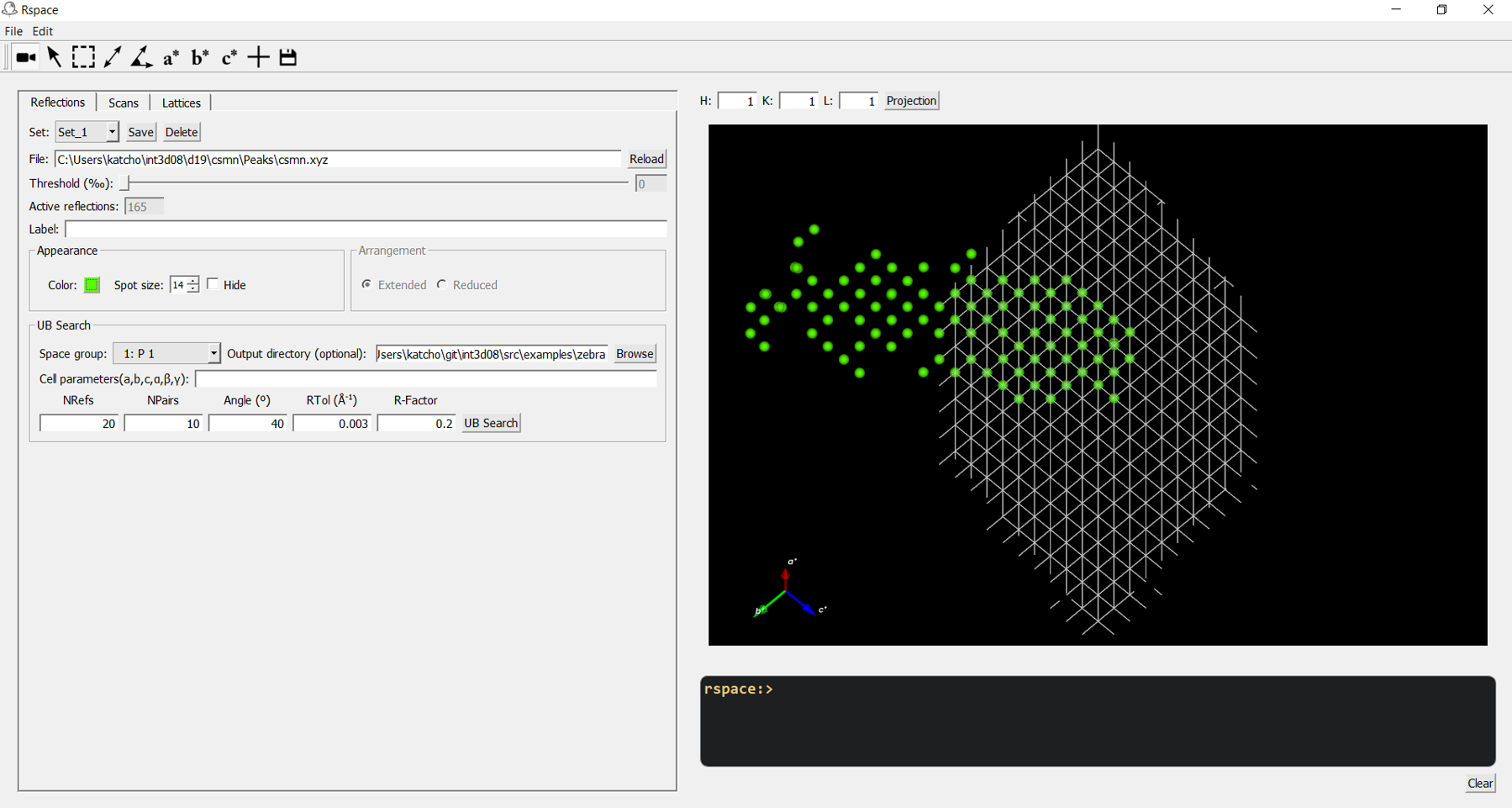
Fig. 9 Graphical user interface of Rspace. Left: Tab Reflections. Right: Viewer. Bottom right: Terminal.
The toolbar
 Camera mode. In this mode, the user can:
Rotate in 3D by holding down the
left mouse buttonwhile moving the mouse.Rotate in a plane perpendicular to the image by holding down simultaneously the
left mouse buttonand thectrlkey while moving the mouse.Zoom by holding down the
right mouse buttonwhile moving the mouse.Translate by rolling the
mouse wheelwhile moving the mouse.Reset by pressing
Rkey after clicking on the image.
 Selection mode. Select individual reflections by mouse click. After selecting a reflection, the following information is displayed on the terminal.
Set: the reflection set to which it belongs
Id: its position in the reflection list
\(q_x,q_y,q_z\): cartesian coordinates of the scattering vector, in angstroms \(^{-1}\).
\(h,k,l\): Miller indexes. They are computed only if a UB-matrix has been set.
\(q\): module of the scattering vector, in in angstroms \(^{-1}\).
\(d\): d-spacing, in angstroms.
Additional data: depending on the file from which the reflection was loaded, some additional data can be available. For instance, the pixels and frame coordinates of that reflection in the scan file, the scan file name, the reflection size or the intensity.
 Multi-selection mode. Select the reflections located in a rectangular area defined by moving the mouse while holding down the
 left mouse button. After selection, a right mouse click opens a menu with the following options:Add to another set: copy the selected reflections to another set, an existing set or a new set.
Move to another set: move the selected reflections to another set, an existing set or a new set.
Invert: invert the selection. Unselected reflections are selected and vice versa.
Delete: remove the selected reflections.
This mode is useful when dealing with twins because it allows to easily assign reflection to twins.
 Distance mode. Compute the distance between two selected reflections. The distance is displayed on the terminal.
 Angle mode. Compute the angle between defined by three selected reflections. The angle is displayed on the terminal.
 Projection along \(a^*\) if an orientation matrix has been set.
 Projection along \(b^*\) if an orientation matrix has been set.
 Projection along \(c^*\) if an orientation matrix has been set.
 Origin. If the icon is checked, the origin of the reciprocal space is shown in the viewer.
 Save. Save the image in a file.