
Powder data reduction
Although Int3D was initially designed to perform single-crystal data reduction, it also contains a small module to carry out the data reduction of powder data. This is because both D19 and XtremeD diffractometers are also used for conducting powder neutron diffraction experiments.
Data collection from powder samples in XtremeD and D19 is usually done by moving the detector horizontally during the collection, i.e., by modifying the gamma value of the detector. Therefore, every frame of the scan corresponds to a slightly different value of gamma, and the same detector pixel of two different frames corresponds to slightly different points of the reciprocal space. The resulting scans are referred to in this user guide as gamma scans.
The gamma scan must be preprocessed before being integrated. This preprocessing is done with the Fortran program gamma_scan. The subsequent integration is done with the Fortran program intpow. Both programs are accesible from the menu bar of the main window (Powder menu).
Preprocessing
Preprocessing refers to the conversion of a gamma scan, i.e., series of frames collected by the real detector positioned at different gamma values, into a single frame of a virtual detector. This conversion is done by the program gamma_scan, which writes a nexus file with just one frame that is ready to be integrated with intpow.
The gamma value of the virtual detector corresponds to the mean gamma value of the gamma scan. The vertical virtual pixel size is equal to that of the real detector, while the horizontal virtual pixel size is derived from the pixel size of the real detector and the scan step. For each frame of the gamma scan, each pixel of the real detector corresponds unambiguously to one virtual pixel. Real pixels of different frames can correspond to the same virtual pixel, i.e., the same point in reciprocal space. The program gamma_scan simply transfers all the counts of the real detector to the virtual detector.
The gamma_scan user interface is shown in the left panel of Fig. 11. A replica of the scan loader is used to select the scans to be processed. The input parameters accepted by the gamma_scan are:
- \(\mathbf{n{\sigma}}\)
In general, different real pixels, each from a different frame of the gamma scan, correspond to the same pixel in the virtual detector. Therefore, we have to average to determine the number of counts of a virtual pixel. \(\sigma\) represents the standard deviation of the average and is used to remove possible outliers. If the counts of a real pixel differ by more than \(n\sigma\) times from the average value, this pixel will be considered as an outlier and it will be removed from the average. Default value:
n = 3.- Threshold
This parameter is used mainly for testing purposes. It can be left empty. Real pixels with counts less or equal than
thresholdare neglected. Default value:none.- Suffix
The name of the
nexusfile written bygamma_scanis the name of the scan file followed bysuffix. Default value:'gsc'.- Calibration file
A calibration file for applying efficiency corrections. Only needed for
XtremeDdata. This file should be provided by the instrument scientist.- Output directory
Folder where the nexus files created by
gamma_scanwill be stored. If the user is working inside a project, by default this directory will be the directoryProcess/inside the project folder. Otherwise, by default it will be the working directory.
After running gamma_scan, the nexus files produced by the program are automatically loaded in the loader. The processed gamma scan can be visualized by double clicking on the corresponding item in the loader.
Demo: Powder data reduction: preprocessing
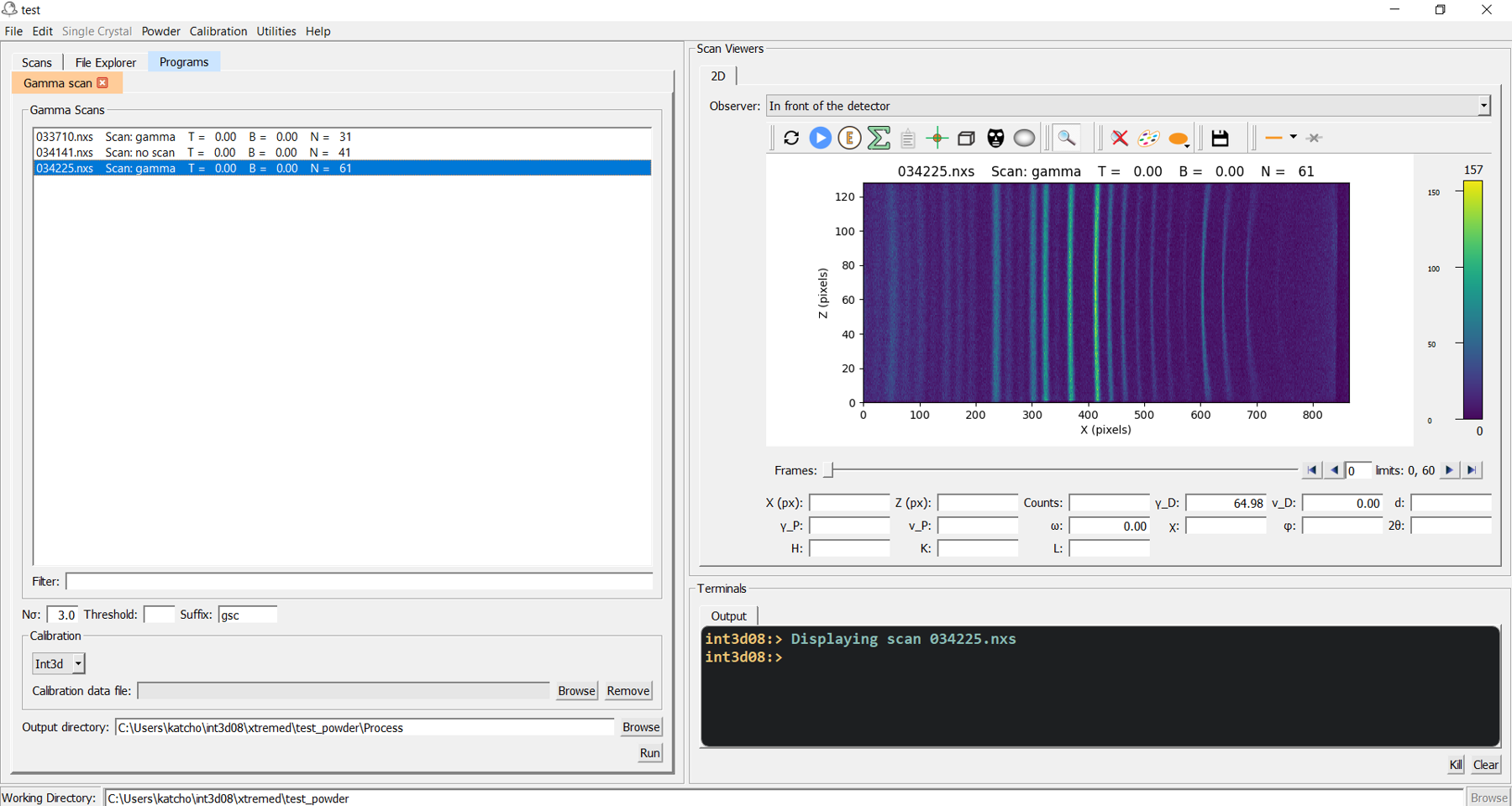
Fig. 11 User interface of gamma_scan (left).
Integration
Integration of powder data is done by running the program intpow, which produces xys files from nexus files. These xys files are used later as input for the structure refinement.
The intpow user interface is shown in the left panel of Fig. 12. A replica of the scan loader is used to select the scans to be integrated. The input required by intpow is explained below:
- Area
Shape of the integration area. At the moment, the only choice is aa rectangle. In future versions, we will introduce the possibility of defining more complex integration areas that will be useful in some experiments such as those performed at high pressure.
- Vertical width
Vertical width of the rectangle, in
pixels.- Z center
Zcoordinate of the rectangle center. Default value:Z center of the detector.- Monitor norm
Monitor counts used for normalization of the diffraction pattern. Default value:
100000.- Gamma detector
Gamma position of the detector. This value is usually written in the nexus file and the user can left this field empty. It is only necessary if the information written in the nexus file is wrong. Default value:
none.- \(\mathbf{2{\theta}_{min}}\), \(\mathbf{2{\theta}_{max}}\), \(\mathbf{\Delta\theta}\)
Minimum, maximum and step values of the \(2\theta\) axis. If the three fields are filled, the \(2\theta\) axis defined in this way will be used for all the integrated patterns. If just \(2{\theta}_{min}\) or \(2{\theta}_{max}\) or both are filled, the integration will be performed between the specified limits with an step value derived from the gamma scans.
- Align
If this option is checked, all the diffraction patterns will be aligned with respect to the first integrated pattern, i.e., the first pattern will define the \(2\theta\) axis for all the integrated patterns. Default value:
unchecked.- Single
If this option is checked, the integration of each individual pattern will be done and a
xysfile with the same name as that of the nexus file will be created. Default value:checked.- Sum
If this option is checked, the field at its right will be enabled. If no number is specified in this field, all patterns will be summed and a single
xyswith all the patterns summed will be created. If a number is specified, say 4, then the patterns will be summed four by four, creating axysfile for each group. The name of thexysfiles created will consist of the name of the first and last nexus file of the group. Default value: code:unchecked.- T_in_label
If this option is checked, the temperature will be included in the name of the
xysfile. In the case where thexysfile corresponds to a series of patterns, the average temperature is used instead. Default value:unchecked.- Calibration file
A calibration file for applying efficiency corrections. Only needed for
XtremeDdata. This file should be provided by the instrument scientist. If the nexus file to integrate has been created by the programgamma_scan, the calibration file must be used when runninggamma_scan. If on the other hand the nexus file to integrate is not a gamma scan but a direct measurement with the detector fixed, the calibration file must be used withintpow.- Output directory
Folder where the
xysfiles will be stored. If the user is working inside a project, by default this directory will be the directoryIntegration/inside the project folder. Otherwise, by default it will be the working directory.- Label
Label added to the
xysfilenames. Default value:none.
Demo: Powder data reduction: integration
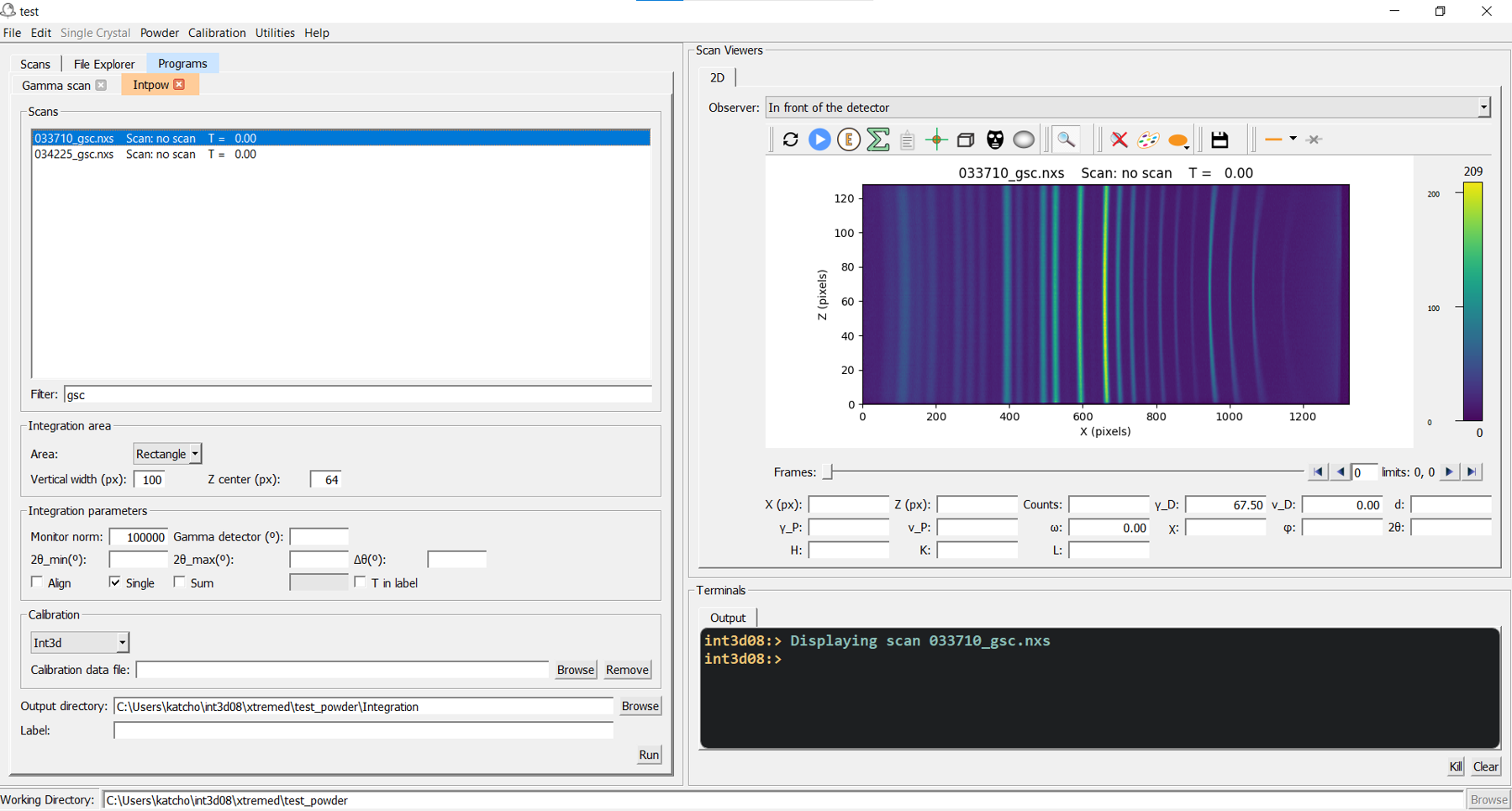
Fig. 12 User interface of intpow (left).